How to Create AI Invitations with ChatGPT & Gemini Using Ready-Made Prompts
Learn how to create personalized AI invitations with ChatGPT and Gemini using ready-made prompts. Follow a practical tutorial to choose designs, enter event details, generate invitations, and correct common mistakes.
Creating an invitation for a birthday, wedding, engagement, baby shower, or housewarming party sounds simple until you start thinking about the details.
You need an attractive design, readable typography, the correct date and time, a complete venue address, and a layout that makes everything look professional.
Traditionally, this meant choosing a design template, manually replacing text, adjusting the spacing, and checking whether everything fitted properly.
Today, AI invitation prompts for ChatGPT and Gemini offer another way to approach this process.
Instead of describing your invitation from scratch every time, you can choose a ready-made invitation design and use its corresponding AI prompt. Some prompts are structured to ask for your event details before generating the invitation, making personalization more straightforward.
The interesting part is that these prompts can do much more than describe colors and decorations.
They can include instructions for collecting information, validating dates, organizing text, controlling design elements, and preventing unwanted details from appearing in the final invitation.
In this guide, we'll explain how ready-made AI invitation prompts work, how to use them with ChatGPT and Gemini, and what you should check before sharing your finished invitation.
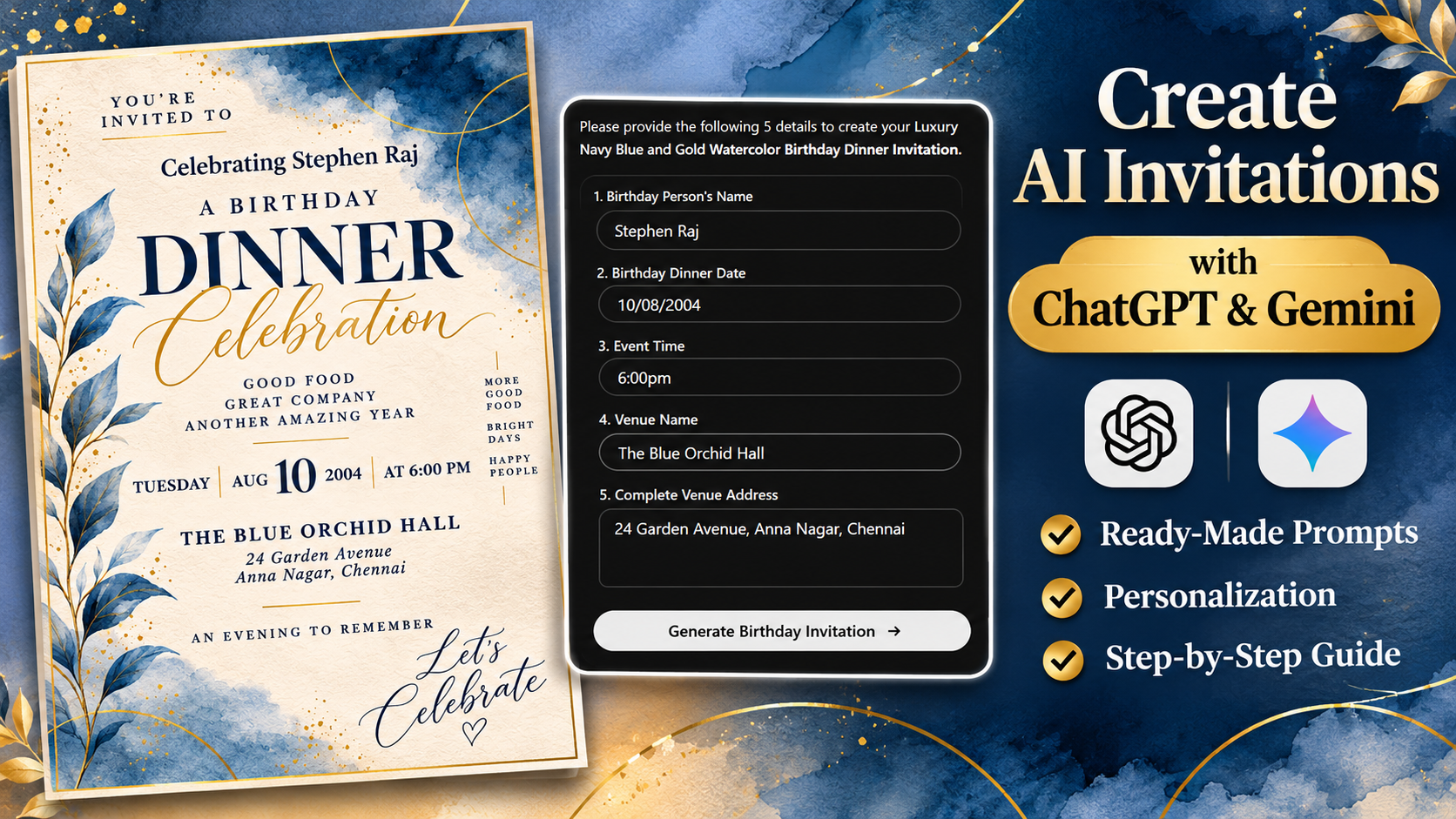
We'll also walk through a real birthday dinner invitation example to demonstrate how personal event information can be turned into a customized invitation image.
What Are Ready-Made AI Invitation Prompts?
A ready-made AI invitation prompt is a prepared set of instructions designed to help an AI image generator create a particular invitation.
Rather than asking ChatGPT or Gemini to produce a completely new design based on a few words, users can start with a prompt that already describes the intended appearance and layout.
For example, a ready-made birthday dinner prompt might specify a warm ivory background, deep navy-blue watercolor decorations, delicate gold circular outlines, and elegant serif typography.
It can also describe where the birthday person's name should appear, how the date should be formatted, and where the venue information belongs.
The purpose is to give the AI a clearer starting point.
A simple instruction such as "Create a luxury birthday invitation" leaves many decisions open to interpretation.
A structured prompt can define those decisions in advance.
This doesn't guarantee an identical result every time, but it can reduce ambiguity and help maintain a recognizable design direction.
Why Reusable Prompts Are Useful
Imagine creating invitations for several different celebrations.
You might need a formal wedding invitation today, a baby shower invitation next month, and a housewarming invitation later.
Writing detailed design instructions for every occasion can become repetitive.
With reusable prompts, each invitation style has its own prepared instructions.
You select the design, provide the relevant event details, and let the AI follow the accompanying prompt.
The visual concept remains the starting point, while personal information changes for each event.
This is especially useful for people who want attractive invitations without spending time learning complex graphic design software.
However, the prompt is a generation tool, not a guarantee of flawless artwork. Every completed invitation should still be reviewed.
How the Ask-First Invitation Workflow Works
One of the most useful features of certain reusable invitation prompts is the Ask First – Generate After Details workflow.
This means the AI is instructed not to create the invitation immediately.
Instead, it should first collect the information required to personalize the design.
For a birthday dinner invitation, that might include the person's name, event date, time, venue name, and complete address.
For a wedding invitation, the required details may include both partners' names and the ceremony information.
Once all the mandatory information has been provided, the AI can proceed with generation.
This approach helps separate two important parts of invitation creation: the design instructions and the personal information.
The design instructions explain what the invitation should look like.
The personal information explains what the invitation should say.
Why Asking for Details First Matters
Consider what happens when someone pastes a generic invitation prompt without supplying a name or date.
The AI may produce a design containing placeholder text, leave information missing, or introduce details the user never intended.
An ask-first prompt is designed to reduce these problems by explicitly requiring certain fields before generation.
For example, the prompt can instruct the AI:
"Do not generate the invitation until the celebrant's name, event date, time, venue name, and complete address have been provided."
This creates a more organized workflow.
It also makes the same design easier to reuse for different people and occasions.
How to Create an AI Invitation with ChatGPT or Gemini
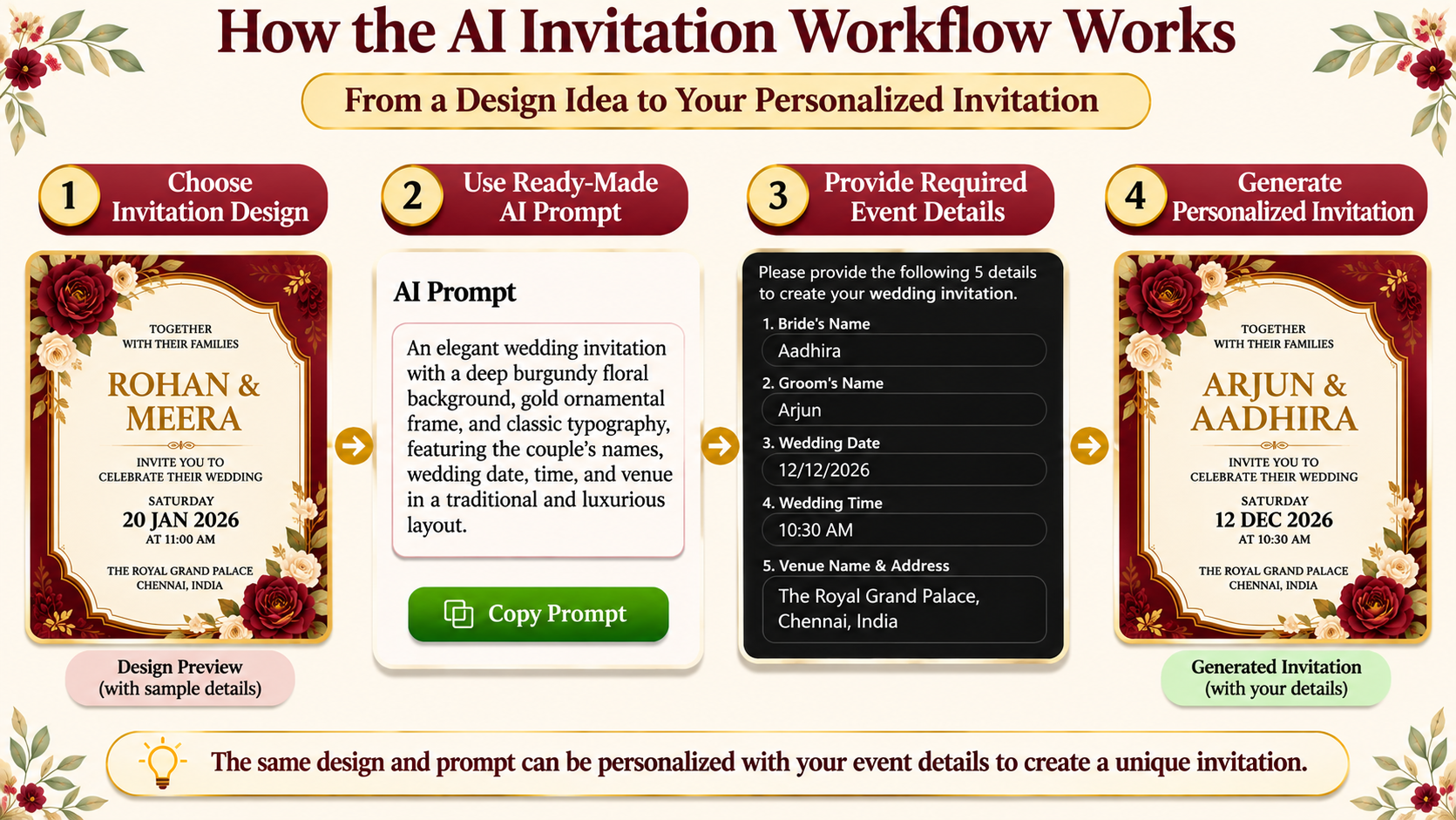
The basic process is straightforward, especially when you start with an invitation design that already has a detailed prompt.
Step 1: Choose an Invitation Design
Begin by deciding what type of invitation you need.
A formal wedding might suit an ivory-and-gold floral design, while a first birthday celebration may benefit from soft watercolor illustrations.
Look beyond the decorations.
Consider whether the design has enough space for your event information, whether the typography is readable, and whether the overall style suits your celebration.
For invitations with longer addresses or additional wording, a clean layout with flexible text spacing is particularly useful.
You can explore different invitation designs and their corresponding AI prompts through the invitation collection on Designs and Prompts.
Step 2: Open the Corresponding AI Prompt
After choosing an invitation, locate the prepared prompt associated with that design.
Depending on the invitation, the prompt may be written as structured JSON or as a detailed set of instructions in regular text.
Both formats can describe how the invitation should be generated.
Read the beginning of the prompt to understand whether it asks for event details automatically or expects you to fill in editable placeholders.
If you're using an invitation collection with a preview and corresponding prompt, make sure you've selected the prompt belonging to the design you want.
Step 3: Use the Prompt in ChatGPT or Gemini
Open ChatGPT or Gemini with access to an appropriate image-generation feature.
Paste the complete prompt or use the available option to open it with your preferred AI tool.
Avoid removing important instructions without understanding their purpose.
A long invitation prompt may contain separate rules for visual layout, typography, date calculation, personalization, and unwanted elements.
Removing these sections can change the intended output.
Step 4: Enter Your Event Information
For an ask-first prompt, provide the information requested by the AI.
Use exact spelling for personal names and venue details.
When entering dates, follow the format specified in the prompt. For example, 10/08/2004 represents August 10, 2004, when interpreted in DD/MM/YYYY format.
For prompts using editable placeholders, replace the relevant fields before asking the AI to generate.
Step 5: Generate the Invitation
After the required information is complete, proceed with image generation.
The AI uses the visual instructions and personal details to create an invitation.
Depending on the prompt, it may include watercolor decorations, botanical illustrations, decorative lettering, or other predefined visual elements.
Step 6: Review the Completed Image
Before sharing the invitation, verify every important detail.
Check the names, date, weekday, time, venue, address, spelling, and general readability.
Also check whether the AI has introduced unexpected decorations or changed important design elements.
If necessary, request a correction or use a design editor to make precise adjustments.
The final review is essential because even detailed prompts cannot guarantee perfect text rendering.
A Real Example: Creating a Personalized Birthday Dinner Invitation
To understand how this process works, let's examine a birthday dinner invitation created using a reusable AI prompt.
The selected design uses a luxury navy-blue and gold watercolor theme.
Its visual instructions describe a warm ivory paper background, large navy watercolor washes, fine gold decorative circles, elegant typography, and a blue botanical illustration along the left side.
The main heading reads "DINNER," accompanied by flowing "Celebration" calligraphy.
The prompt also includes instructions for collecting event details before generating the image.
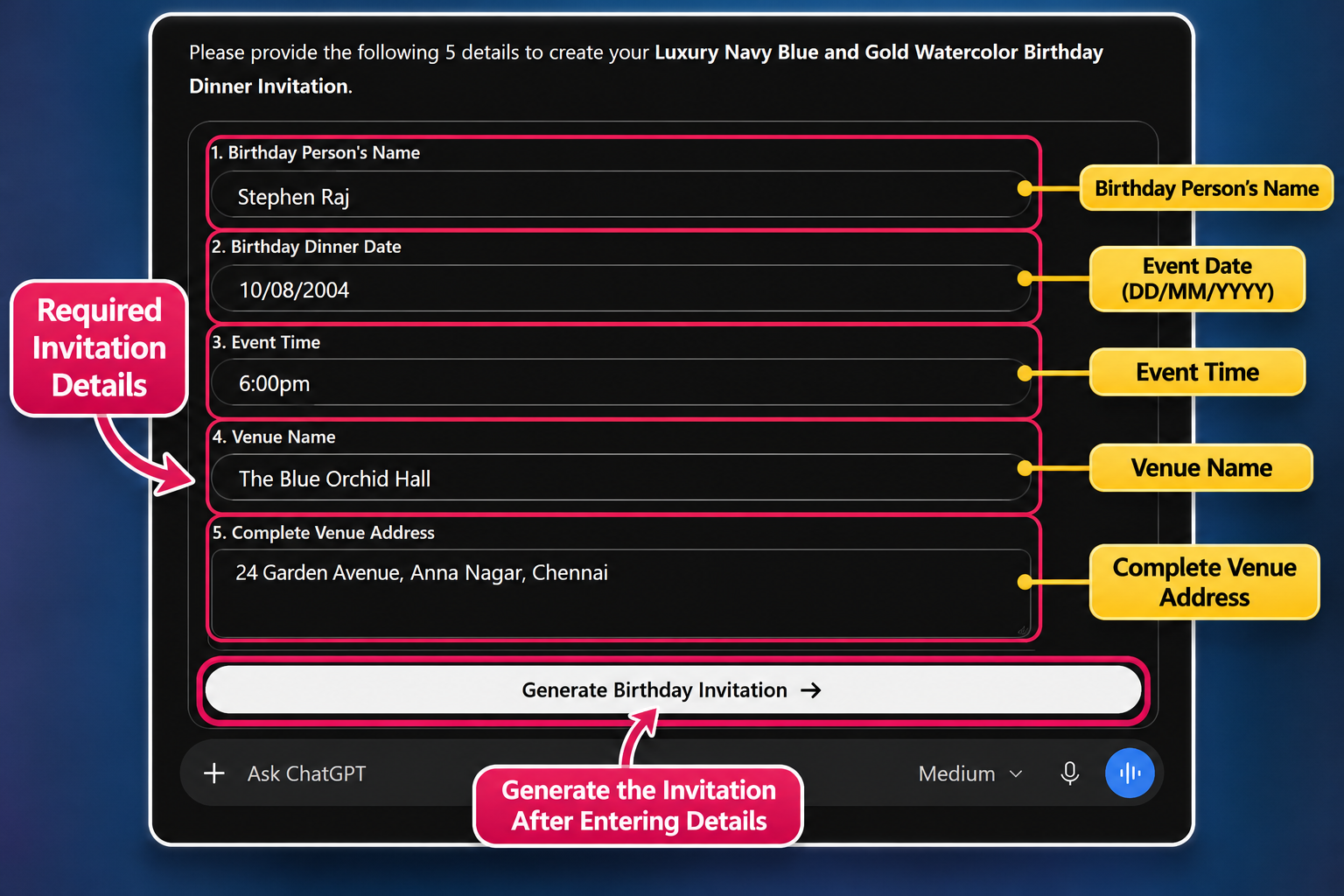
The Details Provided to ChatGPT
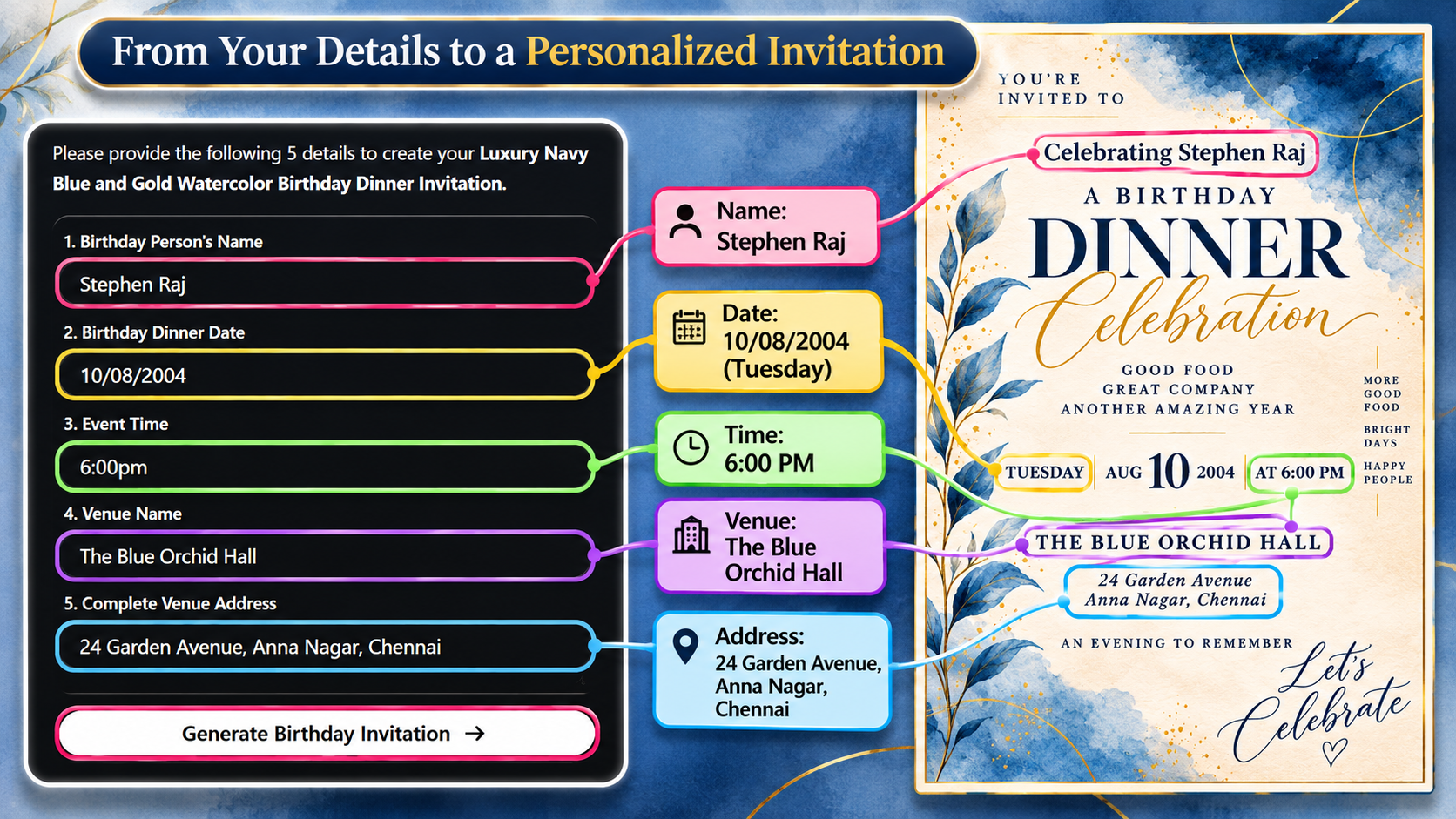
In this example, the following information was entered:
Birthday person's name: Stephen Raj
Birthday dinner date: 10/08/2004
Event time: 6:00 PM
Venue name: The Blue Orchid Hall
Complete venue address: 24 Garden Avenue, Anna Nagar, Chennai
These details were supplied through ChatGPT's event information form.
The date is an example from a past year, used here to demonstrate the workflow rather than advertise an upcoming event.
How the Prompt Used This Information
The AI prompt already contained the visual instructions for the selected invitation.
That meant the user didn't need to separately describe the watercolor background, gold decorations, typography, or invitation layout.
Instead, the personal information was applied to the existing design concept.
The resulting image displayed the celebrant's name, event date, time, and venue within the invitation's structure.
It also displayed the weekday as Tuesday.
For August 10, 2004, Tuesday is the correct weekday, demonstrating the intended calendar verification behavior in this example.
The Final Generated Invitation
The generated birthday dinner invitation followed the navy-blue and gold visual style.
Its main title remained prominent, while the personal event information appeared in the designated areas.
The celebrant's name was positioned above the birthday heading.
The date and time appeared in a horizontal information section, and the venue was displayed beneath it.
The result demonstrates how a reusable design prompt can combine predetermined visual instructions with personalized event details.
What Makes a Structured AI Invitation Prompt Different?
Not all AI prompts have the same level of detail.
A short prompt may describe the overall theme in one paragraph.
A structured prompt can divide the task into several separate instructions, each responsible for a particular aspect of the output.
This helps explain why some reusable invitation prompts are much longer than ordinary image-generation instructions.
Personalization Instructions
These define which pieces of information the AI should request or use.
For example, a wedding invitation may require the couple's names, wedding date, ceremony time, and venue address.
A baby shower invitation may require the mother-to-be's name and celebration details.
The required fields depend on the occasion.
Visual Design Instructions
These describe the intended appearance of the invitation.
They may include background colors, typography, decorative illustrations, proportions, and overall composition.
For example, a luxury invitation might specify deep burgundy velvet, an ivory ornamental panel, fine gold borders, and decorative botanical branches.
These instructions are different from the personal information because they describe the design itself.
Layout Instructions
Layout rules explain how the elements should be organized.
They may specify centered headings, three-column event information, corner decorations, or spacing between text sections.
Some prompts also define approximate positions using percentages of the image canvas.
These measurements help communicate the intended composition, although an AI image generator may not follow every coordinate precisely.
Quality and Restriction Instructions
Structured prompts frequently include rules intended to prevent unwanted results.
Examples include avoiding watermarks, unnecessary logos, additional cards, incorrect text, overlapping illustrations, or unrequested RSVP information.
Such instructions help communicate what the finished invitation should exclude.
Together, these components make the prompt more specific and reusable.
JSON Prompts vs. Regular Text Prompts: What's the Difference?
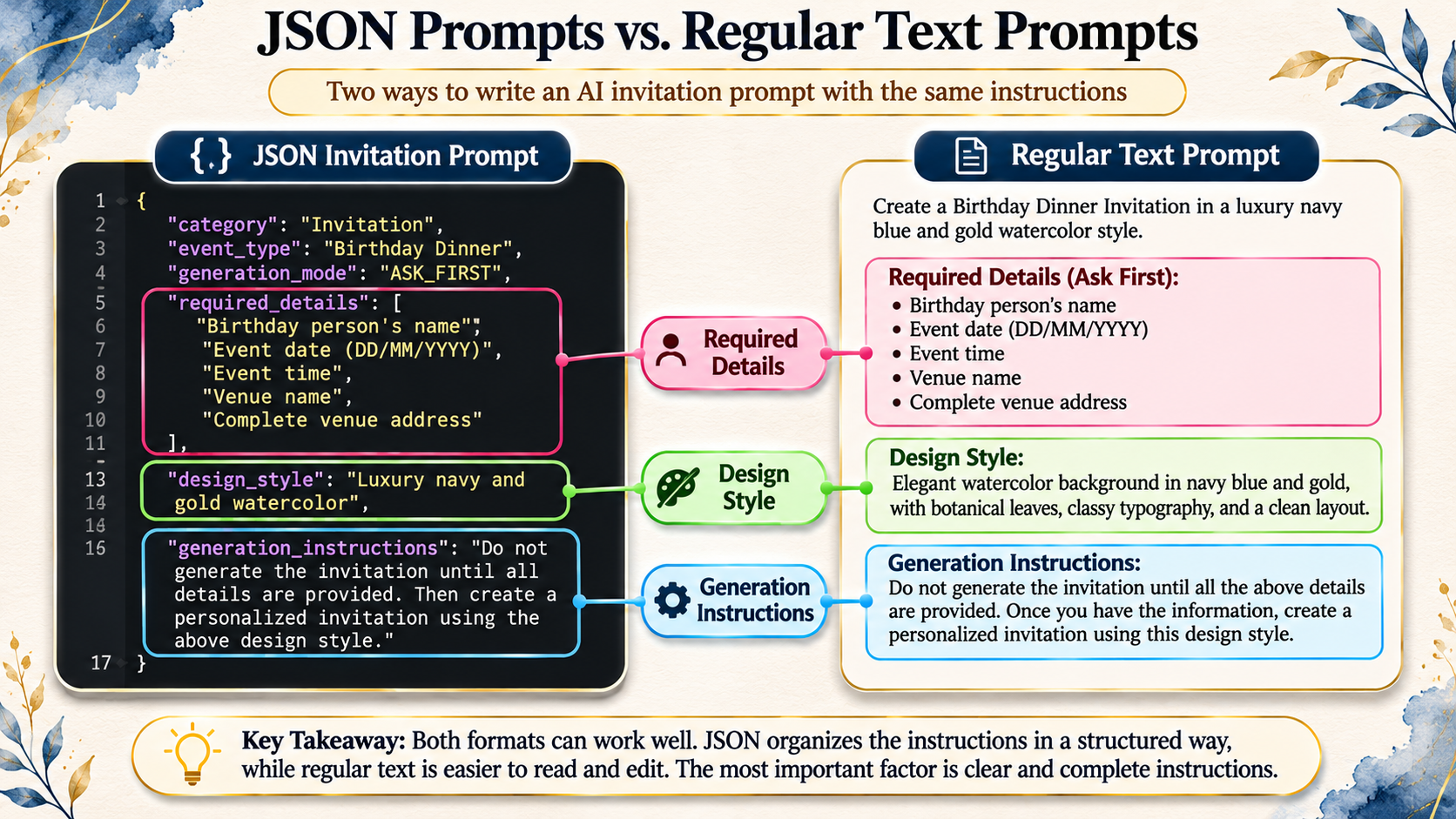
You may notice that some AI invitation prompts use JSON formatting, while others are written as ordinary paragraphs with headings.
Both can contain useful instructions, but they organize information differently.
How JSON Invitation Prompts Work
JSON is a structured text format that uses keys and values to organize information.
For example, a simplified invitation configuration might look like this:
{
  "category": "Invitation",
  "event_type": "Birthday Dinner",
  "generation_mode": "ASK FIRST",
  "required_details": [
    "Celebrant name",
    "Event date",
    "Event time",
    "Venue name",
    "Venue address"
  ],
  "design_style": "Luxury navy and gold watercolor",
  "reference_image_required": false
}
This is a simplified educational example, not the complete invitation prompt.
The structure makes the different instructions easier to identify.
For example, the generation mode describes the expected workflow, while the required details define which information must be collected.
The design style identifies the intended visual appearance.
Important: JSON formatting does not automatically give an AI model special capabilities or guarantee more accurate images. Its main advantage here is that it organizes complex instructions clearly.
How Regular Text Prompts Work
A regular text prompt can provide the same information without JSON formatting.
It might begin with a mandatory information collection section, followed by visual design instructions, typography requirements, and final generation rules.
This format is often easier for people to read and edit directly.
The quality of either format depends on the clarity, completeness, and consistency of its instructions.
Which Format Is Better?
There is no universal winner.
JSON can be useful for organizing long, reusable workflows with many fields.
Regular text can be effective when the instructions are clearly separated into meaningful sections.
When choosing a prompt, focus more on what it communicates than on how it is formatted.
Why Date Validation Is Important in AI Invitations
An incorrect date or weekday is one of the most frustrating errors that can appear in an invitation.
Even if the artwork looks beautiful, conflicting calendar information can confuse guests.
For this reason, some reusable prompts contain explicit date-validation instructions.
These instructions may tell the AI to accept dates in DD/MM/YYYY format, calculate the weekday using the Gregorian calendar, and verify that the displayed date and weekday agree.
Understanding Date Formats
Different regions use different date formats.
For example, 10/08/2004 means August 10, 2004, in DD/MM/YYYY formatting.
In MM/DD/YYYY formatting, the same numbers would mean October 8, 2004.
That is why specifying the date format matters.
When providing your event date, use the format requested by the prompt.
If there's any uncertainty, writing the month as a word can help clarify the intended date.
Why the Weekday Should Be Calculated
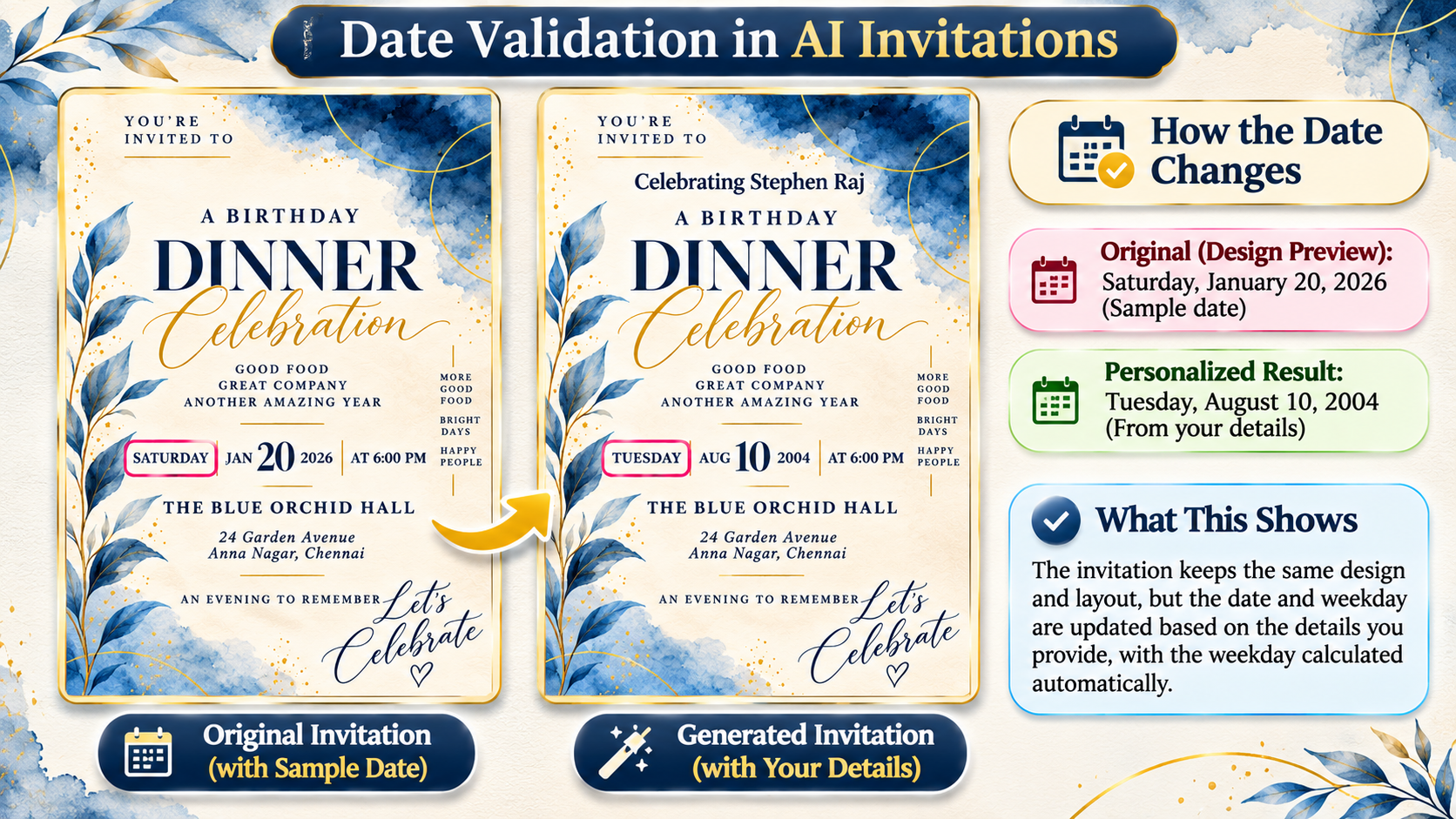
Some invitation previews contain sample weekdays and dates.
Those examples should not be copied blindly into personalized invitations.
The weekday needs to match the user's actual event date.
In our birthday dinner example, the submitted date of August 10, 2004, correctly corresponds to Tuesday.
For a different date, the AI should calculate the appropriate weekday rather than reuse Tuesday.
Even when the prompt includes this instruction, manually verifying the finished invitation remains a sensible final step.
Mandatory Details vs. Optional Invitation Information
Another useful feature of reusable prompts is the distinction between required and optional information.
Mandatory details are necessary to complete the invitation.
Optional details allow additional personalization without forcing every user to supply information they may not need.
For a birthday dinner, the celebrant's name, event date, time, venue, and address may be mandatory.
A personal message or alternative event title may be optional.
For a wedding invitation, additional ceremony wording or reception details may be optional, depending on the prompt.
This separation helps prevent unnecessary questions and keeps the invitation focused.
What Happens When Information Is Missing?
A well-structured ask-first prompt can instruct the AI to request only the missing mandatory details.
For example, if the user provides the event date and venue but forgets the event time, the prompt can tell the AI to ask for the time before generating.
This reduces the likelihood of invented information.
Why RSVP Should Not Always Be Added Automatically
RSVP information is useful for some events, but not every invitation requires it.
Certain invitation designs deliberately exclude RSVP sections to preserve their layout or match the user's preferences.
A reusable prompt can specify that RSVP details should appear only when requested.
This is a good example of how prompt rules control not only what should be generated but also what should be omitted.
Ask-First Prompts vs. Editable Placeholder Prompts
Reusable invitations generally follow different personalization approaches.
Understanding these approaches helps you choose the most convenient workflow.
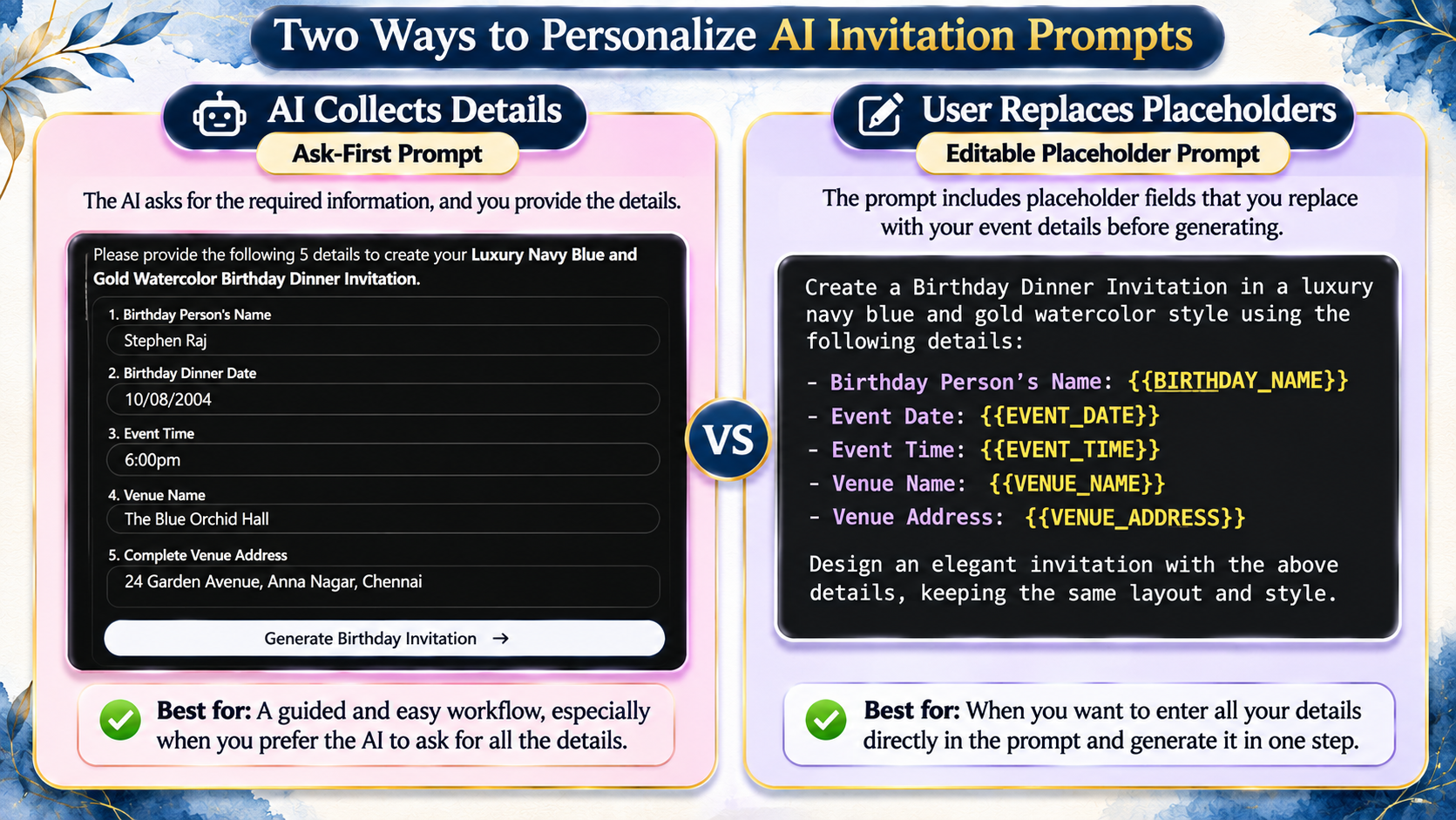
Ask-First Prompts
An ask-first prompt collects the necessary information through questions.
For example, the AI may ask for the couple's names, wedding date, time, and venue before creating the invitation.
The user responds with the required information, and generation proceeds afterward.
This approach is useful because the user doesn't need to search through a long prompt and manually replace every variable.
Editable Placeholder Prompts
Some invitation templates use clearly marked placeholders, such as:
{{CHILD_NAME}}
{{EVENT_DATE}}
{{EVENT_TIME}}
{{VENUE_ADDRESS}}
These fields indicate where personal information should be inserted.
Before generating the invitation, the user can replace the placeholders with the correct values.
This approach can be convenient for people who prefer to edit the information directly.
However, placeholders need careful attention.
If they are left unchanged, the generated output may include unfinished template text.
Similarly, sample names or dates should be replaced rather than accidentally reused.
Which Approach Should You Choose?
Ask-first prompts are useful when you want the AI to guide you through the required information.
Editable placeholders may be preferable when you want to review all personal details together before generation.
Both approaches can work.
The most important factor is whether the prompt clearly defines how personalization should happen.
Can You Create AI Invitations Without Uploading a Reference Image?
Yes. Ready-made prompts can describe an invitation's visual appearance entirely through written instructions.
A prompt might define the background, colors, fonts, illustrations, decorative positioning, and layout without requiring the user to upload the original invitation design.
This is how the featured reference-free invitation prompts are intended to work.
The user selects a design, uses the corresponding prompt, and provides the information requested.
However, a prompt's visual instructions do not guarantee perfect reproduction of an existing preview.
The final appearance can vary depending on how the AI interprets the instructions.
When Personal Photos May Be Useful
Some invitation designs support optional personal photographs.
For example, a traditional baby shower invitation featuring an illustrated couple may offer the choice of using generic characters or personalizing the illustration from photographs.
If personalization is selected, the user may need to provide appropriate photos.
This is different from uploading an original invitation template.
The photos are used to personalize the people shown in the illustration, while the invitation's general design is described by the prompt.
For events where facial resemblance matters, users should carefully review the generated identities and obtain permission before using other people's photographs.
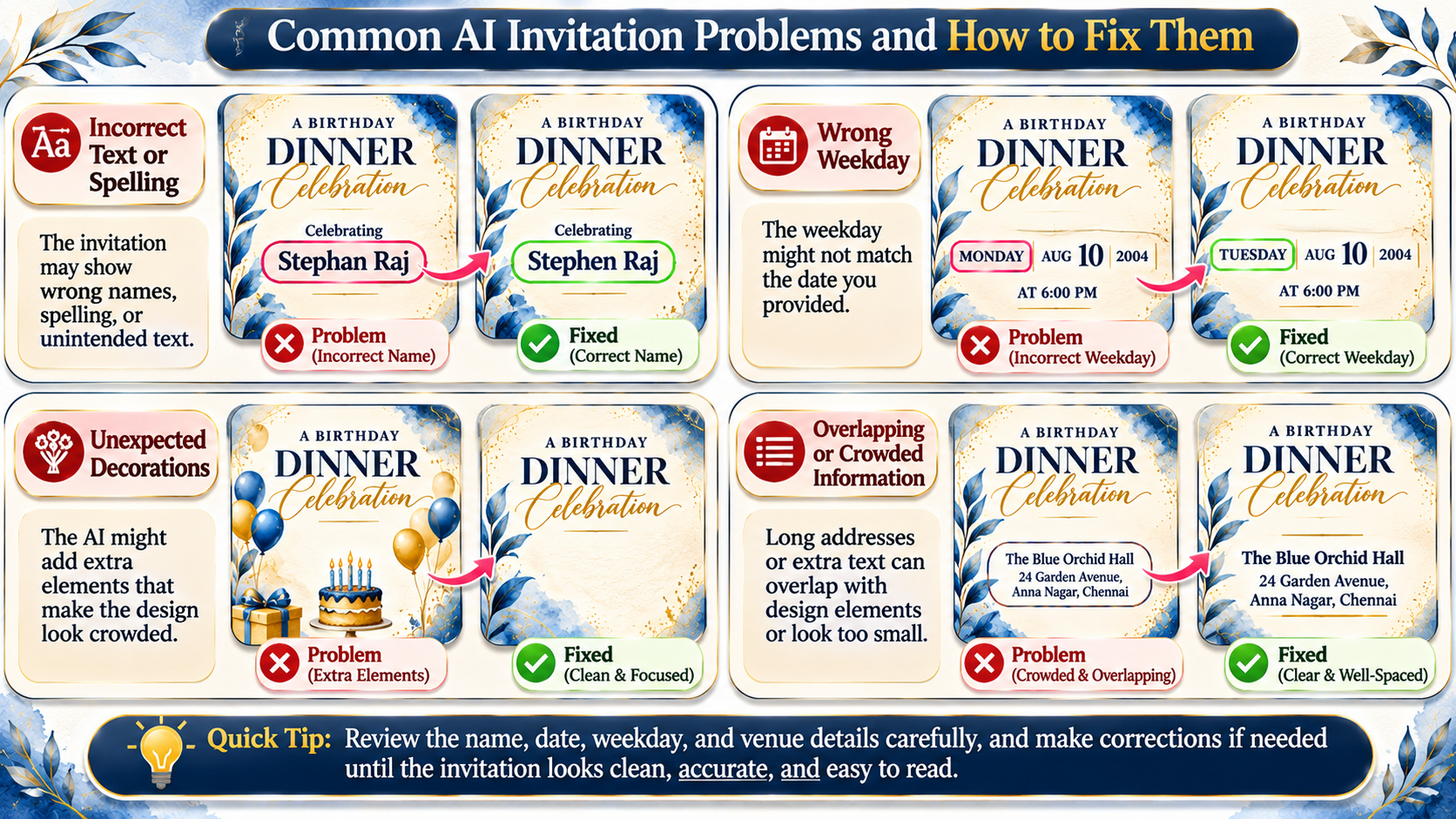
Common AI Invitation Problems and How to Fix Them
Even a detailed invitation prompt may occasionally produce an imperfect result.
Understanding common problems can save time and make corrections easier.
The AI Generates Before Asking for Details
If the prompt is supposed to collect event information first but immediately generates an invitation, reinforce the workflow instruction.
You can tell the AI to stop and request all mandatory details before continuing.
For reusable prompts, placing the ask-first rule prominently near the beginning can make the intended sequence clearer.
The Invitation Contains Incorrect Names or Spelling
Image generators can make mistakes when rendering text, particularly with complex lettering or unfamiliar names.
First, check whether the original information was entered correctly.
Then request a correction that preserves the exact spelling and avoids changing unrelated elements.
For critical printed invitations, manually adding text in a design editor may provide more reliable control.
The Generated Date or Weekday Is Wrong
Check the date format and verify the weekday independently.
If the AI has interpreted DD/MM/YYYY as MM/DD/YYYY, restate the date using the full month name.
Then ask for the corrected date and weekday.
Never assume that a date-validation instruction guarantees the displayed text is correct.
The AI Changes the Original Design Too Much
Sometimes the generated invitation uses different colors, illustrations, or layouts from the selected preview.
This can happen because image-generation prompts are interpreted rather than executed as exact design specifications.
You can reinforce the most important visual requirements, including the background color, primary typography, illustration placement, and composition.
Avoid rewriting the entire design unless you actually want a different style.
The Invitation Contains Extra Decorations
An AI may introduce additional flowers, ornaments, borders, or decorative symbols.
If these elements make the invitation look crowded, request a simpler version while specifying which original elements must remain.
For example, you might ask the AI to preserve the main botanical illustration but remove unrelated decorative objects.
The Address Is Too Small or Overlaps Decorations
Long addresses can create layout problems, especially in narrow portrait invitations.
Try separating the address into clear lines, reducing nearby decorative elements, or creating more space in the venue section.
Do not make the text so small that guests cannot read it.
The Image Is Not Suitable for Printing
A generated image may appear sharp on a smartphone but contain insufficient detail for large prints.
Check the actual pixel dimensions, intended print size, text sharpness, and any printer specifications.
A prompt that requests 300 DPI does not automatically guarantee that the generated image has enough pixels for the desired printed size.
For important invitations, consider finalizing the artwork and typography in a design editor before printing.
How to Improve a Reusable AI Invitation Prompt
If you regularly use AI invitation prompts, small improvements to their instructions can make the workflow easier to understand and reuse.
Start by separating the prompt into logical sections.
The first section should explain what information the AI needs.
The next should describe the visual design.
Additional sections can define layout rules, text handling, date verification, and unwanted elements.
Make Required Fields Explicit
Instead of broadly asking for "event details," identify the exact information required.
This helps prevent missing addresses, venue names, or ceremony times.
Keep Personal Information Separate from Design Instructions
Names and event dates should be treated as variable information.
Colors, typography, and decorative arrangements should be treated as visual instructions.
This makes the prompt easier to reuse without accidentally changing the overall theme.
Use Clear Rules for Optional Content
If RSVP details, personal photographs, or additional wording are optional, state that clearly.
Avoid automatically adding information the user has not provided.
Avoid Conflicting Instructions
A prompt may become less effective when it contains contradictory requirements.
For example, telling the AI to keep an exact layout while also requesting large amounts of additional text can create unnecessary conflict.
The prompt should explain which elements are most important and where adjustments are permitted.
Include a Final Verification Step
A useful prompt can ask the AI to check that the event information is complete, names are spelled correctly, and the displayed date agrees with the weekday.
This cannot replace human review, but it can make the intended quality checks explicit.
Where to Find Ready-Made AI Invitation Prompts
If you want to create invitations without writing detailed visual instructions from scratch, ready-made prompts can provide a useful starting point.
You can begin by exploring different invitation styles, choosing a design that matches your occasion, and checking which customization details the corresponding prompt requires.
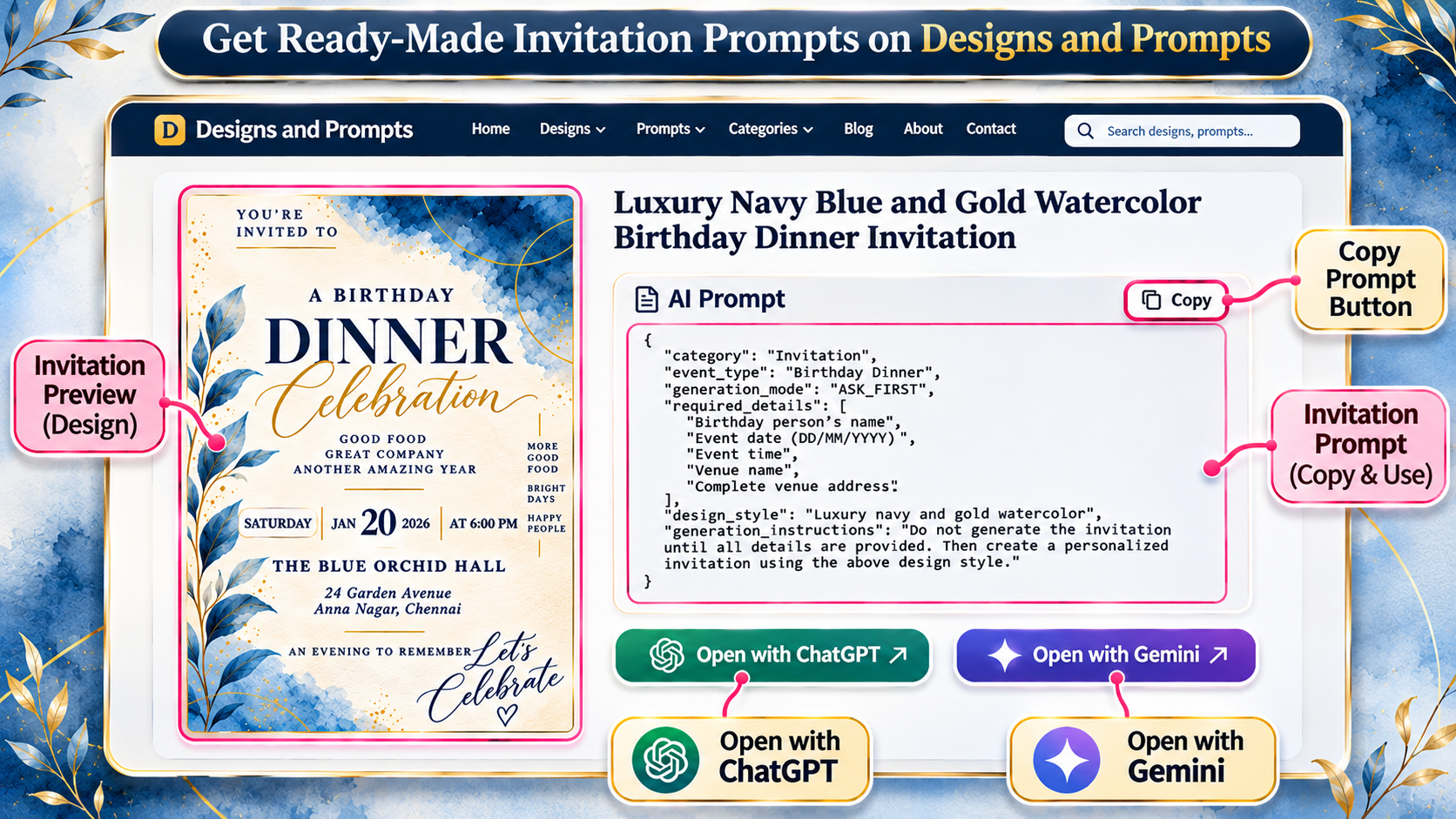
On Designs and Prompts, you can explore invitation designs for different occasions and access their corresponding prompts.
These include wedding invitations, engagement celebrations, baby showers, birthday dinners, first birthdays, housewarming parties, and traditional ceremony invitations.
Choose a design that suits the event, review the corresponding prompt, and use it with ChatGPT or Gemini to create your personalized invitation.
The advantage is not simply saving time writing instructions.
It is having a defined design concept and personalization workflow to work from.
For more creative website ideas and practical AI-assisted creation guides, you can also explore Websites and Prompts.
Explore Ready-Made AI Invitation Prompts
Frequently Asked Questions
Can ChatGPT create invitations from ready-made prompts?
Yes. With access to image generation, ChatGPT can create invitation artwork using detailed prompts that describe the design and personalized event information. Results should be checked for text and layout accuracy.
Can I use the same invitation prompt with Gemini?
You can use compatible written invitation prompts with Gemini's image-generation capabilities. The resulting appearance and interaction may vary depending on the model and available features.
Do I need to know JSON to use an AI invitation prompt?
No. You can copy and use a prepared JSON prompt without writing JSON yourself. The structure simply organizes instructions for the AI.
Why does an AI invitation prompt ask questions before generating?
Some prompts are designed to collect mandatory event details first. This helps the AI personalize the invitation and reduces the risk of missing or invented information.
Can I create invitations without uploading a reference image?
Yes. Reference-free prompts contain written instructions describing the design. Certain invitation styles may optionally request personal photographs for character or portrait personalization.
Can I change the invitation design after generating it?
You can request changes to colors, decorations, wording, or layout. However, significant modifications may alter the original design style, and precise text or layout corrections may be easier in a design editor.
Are JSON prompts better than normal prompts?
Not automatically. JSON can help organize longer instructions, but the clarity and consistency of the instructions matter more than the formatting alone.
Can the AI calculate the correct weekday automatically?
A prompt can instruct the AI to calculate the weekday from a supplied date. However, you should independently verify the result before sharing the invitation.
What if the AI invitation contains incorrect text?
Request a correction using the exact spelling or information required. If the image generator continues to make mistakes, consider manually replacing the text in a suitable editing application.
Can AI invitations be printed?
Yes, provided the final image has suitable dimensions, adequate resolution, readable typography, and appropriate print preparation. Always check the printer's requirements before ordering prints.
Final Thoughts
Creating personalized invitations with AI becomes easier when the process is clearly organized.
Rather than writing every design instruction from scratch, a ready-made invitation prompt can provide the intended visual style, layout, typography, and personalization rules.
The ask-first workflow adds another useful layer by collecting important event details before generation.
Structured prompts can also define how dates should be interpreted, which information is optional, and which unwanted elements should be excluded.
As our birthday dinner example demonstrates, a prepared design prompt can take personal event information and transform it into a customized invitation while maintaining a recognizable visual direction.
The most important thing is to treat AI generation as part of the creative process, not as a replacement for reviewing important details.
Choose an appropriate design, use the complete prompt, enter accurate information, and carefully check the resulting invitation.
If you're ready to explore different invitation styles, visit Designs and Prompts to discover ready-made AI invitation prompts for weddings, birthdays, baby showers, engagements, housewarming celebrations, and more.
A good prompt gives your invitation direction. Your personal details make it meaningful.